TL;DR
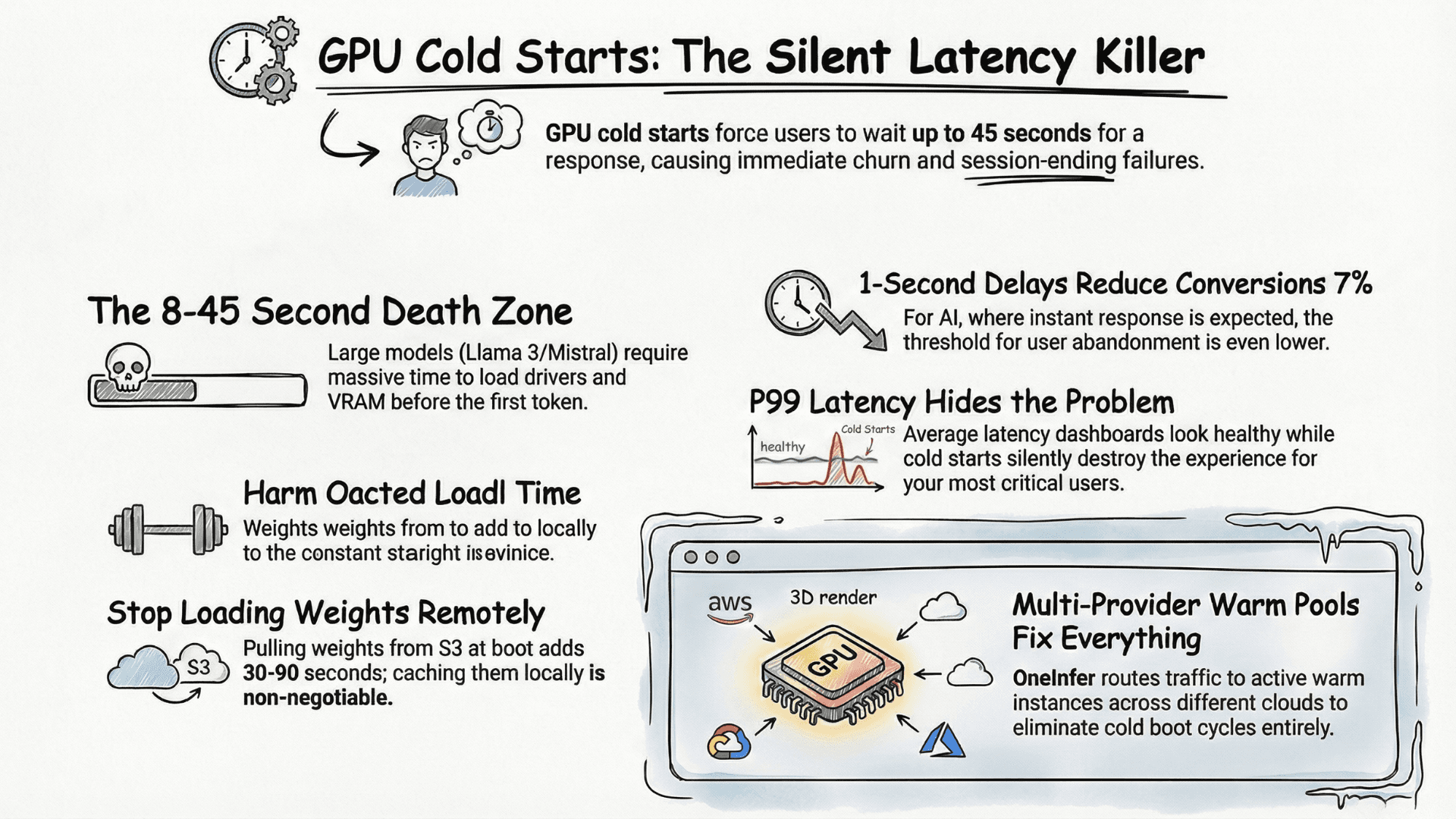
GPU cold starts add 8–45 seconds to first-token latency on serverless LLM endpoints. The four root causes are scale-to-zero serverless without warm pools, single-provider dependency, remote model weight loading, and hidden P99 spikes. The fix is multi-provider warm pools, locally cached weights, minimum-warm-instance floors, and monitoring that alerts on P99 separately from P50.
What Is a GPU Cold Start?
A GPU cold start happens when an inference server scales to zero and must reinitialize before processing the next request: GPU drivers, VRAM allocation, model weight loading from remote storage, and CUDA context warmup all happen sequentially before a single token is generated.
For Llama 3 70B or Mistral Large class models, this initialization window runs anywhere from 8 to 45 seconds depending on infrastructure choices. In a user-facing AI product that's not a performance issue — it's a session-ending failure. For any team evaluating the best AI inference platform in 2026, cold start latency belongs at the top of your evaluation matrix, not the bottom.
Why Cold Starts Hide in Your Metrics
Cold starts rarely appear in average latency dashboards. P50 looks healthy. P95 looks acceptable. But P99 is silently destroying the experience for a meaningful percentage of users — and those users don't leave feedback, they just leave.
Most teams compound this by running on a single GPU provider with no failover. When that provider experiences capacity pressure, warm instances get preempted and you're back to cold boots under live traffic. The problem isn't just startup speed — it's the unpredictability of when cold starts happen at scale.
According to Google's research on web performance, even a one-second delay reduces conversions by 7%. For AI products where users expect instant responses, the threshold is even lower.
The Four Root Causes
1. Serverless-first architecture without minimum warm instances
Serverless GPU inference is cost-attractive, but without a minimum warm instance floor, every idle window resets your latency baseline. Managed platforms like AWS SageMaker offer provisioned concurrency for this reason — teams routinely skip it to save money, then pay in user experience.
2. Single-provider dependency
When your entire AI inference pipeline sits on one GPU cloud, you have no automatic failover when spot capacity dries up or instances get preempted. Cold start windows become longer and more frequent precisely when traffic is highest.
3. Model weights loaded remotely on every boot
If your container pulls model weights from S3 or GCS at boot time instead of caching them locally on the node, you're adding 30–90 seconds of pure I/O latency before inference begins. For any serious LLM deployment platform this is table stakes.
4. No P99-specific alerting
If your alerts fire on average latency, cold starts will live in your tail. Your P50 lies. Your P99 tells the truth.
How OneInfer Eliminates Cold Starts
OneInfer was designed as a top AI inference platform specifically to solve this class of problem at the infrastructure layer. Rather than optimizing a single-provider setup, we built a multi-provider GPU orchestration layer that maintains warm capacity across providers simultaneously.
Our Smart Aggregator routes incoming inference requests to the fastest available warm instance — H100 SXM, A100 80GB, or L40S — across multiple GPU clouds in real time. When one provider experiences capacity pressure, traffic automatically shifts to the next warm pool without a cold boot cycle on your side.
Our dedicated endpoint model goes further: container images are pre-cached on the node, model weights are pinned in GPU memory between requests, and a rolling warm buffer is sized to your actual traffic pattern. This is what separates a purpose-built LLM serving platform from a general-purpose cloud with GPU instances bolted on.
What You Can Do Today
Even without a multi-provider setup, you can materially reduce cold starts:
- 1Pre-load model weights into a persistent volume, not remote object storage. This alone cuts boot time by 40-70% for most large models.
- 2Set a minimum warm instance count of at least 1. One idle GPU-hour on OneInfer is almost always cheaper than the revenue impact of cold-start churn — an RTX 4090 node runs at $0.29/hr.
- 3Use vLLM's continuous batching to keep GPU utilization high during warm windows.
- 4Alert on P99 separately from P50. If the gap exceeds 3x, you have a cold start problem, not a capacity problem. Prometheus with Grafana gives you this breakdown in under an hour.
The Bottom Line
Cold starts are a symptom of infrastructure designed for stateless, CPU-style workloads applied to a fundamentally stateful AI serving problem. GPU memory is precious. Model weights are large. Users have zero tolerance for 10-second first-token latency.
The teams succeeding with production AI in 2026 aren't just selecting better models — they're choosing the right LLM inference platform with warm pool management built in from day one.
If you're ready to eliminate cold starts from your inference pipeline, explore OneInfer's platform or talk to the team about your specific workload.
Run multimodal AI inference at production scale
OneInfer routes every request to the optimal GPU across multiple cloud providers in real time, with sub-500ms latency, AI-generated kernel optimization, and transparent pricing.
Frequently asked questions
+What is a GPU cold start in AI inference?
A GPU cold start is the initialization period when an idle inference server must load GPU drivers, allocate VRAM, fetch model weights, and warm up CUDA contexts before generating its first token. For large LLMs this typically takes 8 to 45 seconds.
+How long does a typical GPU cold start take?
For models in the Llama 3 70B or Mistral Large class, cold starts run 8 to 45 seconds depending on infrastructure. Pre-cached weights and warm-pool architectures reduce this to under 1 second.
+Why don't GPU cold starts show up in average latency?
Cold starts hide in the long tail of P99 latency. Average and P50 latency stay healthy because cold starts only affect a small percentage of requests, but those requests destroy user experience for affected sessions.
+How does OneInfer eliminate GPU cold starts?
OneInfer maintains warm capacity across multiple GPU cloud providers simultaneously, pre-caches container images on each node, pins model weights in GPU memory between requests, and routes traffic dynamically to the fastest warm instance — eliminating cold boots from the user-facing path.
+What is the cheapest way to keep a GPU warm for inference?
Running a single RTX 4090 node at $0.29/hr on OneInfer as a minimum warm instance is typically cheaper than the revenue lost to cold-start user churn for any production AI product.